
BetPaisa Deposit and Withdrawal – Add & Withdraw Money in Pakistan
Managing your balance should be straightforward. BetPaisa provides deposit and withdrawal options so players can add funds to their account, use their available balance in games, and request withdrawals when they are ready.
This page explains how BetPaisa deposit and withdrawal works, what to check before making a transaction, how to avoid common payment problems, and what to do when a deposit or withdrawal does not appear as expected.
Important: Payment methods, minimum amounts, processing times, fees, and verification requirements can change. Always use the payment options and instructions displayed inside your current BetPaisa account rather than relying on an old payment detail.
BetPaisa Deposit Options
A deposit adds money to your BetPaisa balance. After signing in, open the wallet or deposit section and select one of the payment methods currently available for your account.

For users in Pakistan, payment options can include local methods such as JazzCash, Easypaisa, bank transfer, and Cryptocurrency.
How to Deposit on BetPaisa
- Log in to your BetPaisa account.
- Open the Wallet, Deposit, or Balance section.
- Select Deposit.
- Choose an available payment method.
- Enter the amount you want to add.
- Follow the payment instructions shown on screen.
- Complete the payment using your selected method.
- Return to BetPaisa and check your balance.
- Keep the transaction reference or receipt until the balance is updated.
Always check the recipient details carefully before confirming a payment. A payment sent to the wrong account or an incorrect payment channel can be difficult to recover.
Deposit Through JazzCash
If JazzCash is available in your BetPaisa account, select it from the deposit methods and follow the instructions provided by BetPaisa.
Before confirming the transaction:
- Check the payment number or account details.
- Enter the correct deposit amount.
- Make sure the payment is completed successfully.
- Save the transaction ID or confirmation message.
- Check your BetPaisa balance after completing the payment.
Do not send money to an old payment number found in a screenshot, social-media post, message, or third-party website. Use the current details displayed through your BetPaisa account.
Deposit Through Easypaisa
Easypaisa can provide another convenient local payment route when it is available in the BetPaisa wallet.
The process is similar:
- Open Deposit after logging in.
- Select Easypaisa.
- Check the current payment instructions.
- Enter the required amount.
- Complete the transaction through Easypaisa.
- Save your confirmation or transaction reference.
- Check the BetPaisa wallet.
The payment instructions shown at the time of your transaction take priority over information published elsewhere.
What to Check Before Making a Deposit
A successful deposit starts with using the correct information.
Before paying, check:
| Check | Why It Matters |
|---|---|
| Payment method | Confirms the selected channel is currently supported |
| Account/payment details | Prevents sending money to the wrong destination |
| Deposit amount | Ensures the correct amount is submitted |
| Transaction reference | Helps with payment support |
| Account status | Some transactions require a verified account |
| Wallet balance | Confirms whether the deposit has arrived |
Never share your BetPaisa password, OTP, wallet PIN, or other private security information with another person claiming to provide payment assistance.
BetPaisa Withdrawal – How to Withdraw Money
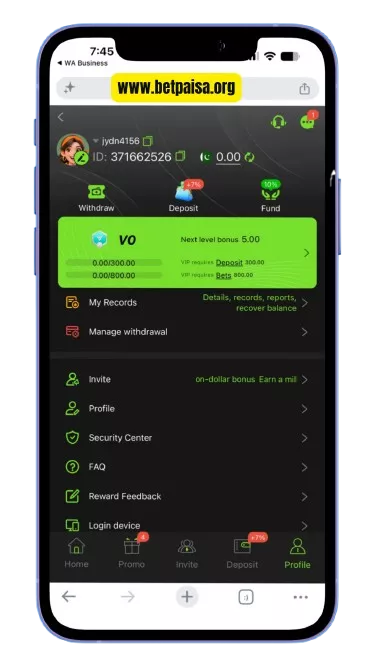
A withdrawal moves an available balance from your BetPaisa account to a supported payment method.
The withdrawal process normally starts from the Wallet or Withdraw section. Your account may need to meet certain requirements before a withdrawal request can be submitted.
How to Withdraw from BetPaisa
- Log in to BetPaisa.
- Open your Wallet or balance section.
- Select Withdraw.
- Choose an available withdrawal method.
- Enter the amount.
- Enter or select the required receiving account details.
- Review the information carefully.
- Submit the withdrawal request.
- Save the request or transaction reference.
- Check the withdrawal status from your account.
Make sure the receiving payment account belongs to you and that its information matches the details required by BetPaisa.
BetPaisa Withdrawal Methods in Pakistan
The withdrawal methods available to you depend on the current payment system connected to your BetPaisa account.
Common local options may include:
- JazzCash
- Easypaisa
- Bank transfer
- Other payment methods displayed in the BetPaisa withdrawal section
Not every method is necessarily available at every time. Instead of assuming a payment option is supported, check the Withdraw page inside your account before submitting a request.
BetPaisa Minimum Deposit and Withdrawal
Minimum and maximum transaction limits are important when managing your wallet.
BetPaisa can display different limits depending on the selected payment method, account status, and current payment configuration. For this reason, the amount shown on the live Deposit or Withdraw screen should be treated as the current limit.
If a withdrawal cannot be submitted because of an amount restriction, adjust the amount according to the limit displayed in your account.
How Long Does a BetPaisa Withdrawal Take?
Withdrawal processing is not necessarily instant.
The time can depend on:
- BetPaisa processing
- The selected payment method
- Account verification
- Payment-provider processing
- Transaction volume
- Incorrect or incomplete account information
A pending withdrawal does not automatically mean the transaction has failed. First check the withdrawal status in your BetPaisa account and allow the stated processing period to pass.
If the status remains unchanged beyond the expected period, contact BetPaisa support with your transaction reference.
BetPaisa Deposit Pending or Not Showing
One of the most common payment questions is: “I deposited money, but my BetPaisa balance has not updated.”
Do not immediately make another deposit.
Instead:
Check Your Payment Status
Open the payment service you used and confirm whether the transaction was actually completed.
Keep Your Transaction ID
Your payment reference is useful when support needs to trace a transaction.
Wait for the Payment to Update
Some payment systems take time to confirm and reflect a completed transaction.
Check Your BetPaisa Wallet
Log out and back in if necessary, then check the current wallet balance and transaction history.
Contact Support if Necessary
If the payment was completed but your BetPaisa balance remains unchanged, provide support with the transaction reference and relevant payment information.
Do not repeatedly submit the same payment while the first transaction is still being checked.
BetPaisa Withdrawal Pending
A pending withdrawal means the request has not yet reached its final status.
Before contacting support, check:
- Withdrawal amount
- Payment method
- Receiving account details
- Withdrawal status
- Account verification status
- Transaction/reference number
If the withdrawal information is correct, avoid repeatedly cancelling and resubmitting requests unless BetPaisa specifically instructs you to do so.
If the request remains pending longer than the processing period shown by BetPaisa, contact support and include the withdrawal reference.
BetPaisa Withdrawal Failed or Rejected
A withdrawal can fail because of incorrect receiving details, account restrictions, verification requirements, payment-method problems, or other transaction checks.
If your withdrawal fails:
- Check the reason displayed in your BetPaisa account.
- Verify the receiving account details.
- Check whether your account requires verification.
- Confirm that the withdrawal amount meets the current limits.
- Review whether the selected payment method is still available.
- Submit a new request only after correcting the issue.
- Contact support when the reason is unclear.
Do not send additional money to someone claiming that an extra payment is required to “unlock” or “release” your withdrawal unless the requirement is clearly shown through the official BetPaisa payment system.
Deposit vs Withdrawal on BetPaisa
| Feature | Deposit | Withdrawal |
|---|---|---|
| Purpose | Add funds to wallet | Move available balance out |
| Starting point | BetPaisa → Payment method | BetPaisa → Receiving method |
| Main requirement | Successful payment | Eligible available balance |
| Confirmation | Payment reference | Withdrawal/request reference |
| Common issue | Balance not updated | Request pending |
| Important check | Correct payment details | Correct receiving details |
Understanding this difference helps prevent unnecessary payment mistakes.
Why a BetPaisa Payment Can Fail
Payment problems usually come down to a small number of issues.
Incorrect Payment Details
Entering the wrong number, account, or recipient information can prevent a transaction from being credited correctly.
Wrong Payment Method
A payment method may no longer be available or may not support the transaction you are trying to make.
Account Verification
Some account or wallet operations can require additional verification before completion.
Transaction Limits
The amount may be outside the current minimum or maximum allowed by the selected payment method.
Payment Provider Delay
A completed payment can sometimes take time to reach the BetPaisa wallet.
Temporary Technical Issue
A payment page, wallet, or payment provider can experience a temporary interruption.
The best approach is to identify where the transaction stopped instead of immediately repeating the payment.
How to Keep BetPaisa Payments Safe
Your payment security depends on protecting both your BetPaisa account and your payment account.
Follow these basic rules:
- Use the official BetPaisa website or app access point.
- Check payment details before every transaction.
- Never share OTPs or account passwords.
- Never give your withdrawal PIN or security credentials to another person.
- Keep transaction receipts and reference numbers.
- Do not use payment details copied from random social-media posts.
- Do not install modified versions of the BetPaisa APK.
- Avoid allowing another person to control your account remotely.
- Contact official support when a transaction requires investigation.
BetPaisa support should never need your account password or one-time security code to check a payment.
Deposit and Withdrawal Troubleshooting
My deposit was successful but my balance is unchanged
Confirm the payment status, save the transaction reference, refresh your BetPaisa account, and check the transaction history. If the payment remains missing, contact support with the reference.
My withdrawal is pending
Check the withdrawal status and processing information shown in your account. If it exceeds the stated period, contact support with your withdrawal reference.
My withdrawal was rejected
Read the rejection reason, verify your receiving details, check account requirements and transaction limits, then correct the issue before submitting another request.
I entered the wrong payment details
Contact support immediately and provide the transaction information. Do not make another payment until you know the status of the original transaction.
The payment page is not loading
Check your internet connection, refresh the page, try again later, or use another supported browser/device. If the problem continues, check BetPaisa support for a current service notice.
I did not receive a transaction confirmation
Check both your BetPaisa transaction history and the payment provider’s transaction history. The transaction reference from either side can help support investigate the issue.
BetPaisa Wallet and Transaction History
Your wallet is more than a place to see your balance. Transaction records help you understand what happened to previous deposits and withdrawals.
After making a payment, check:
- Transaction amount
- Date and time
- Payment method
- Transaction status
- Reference number
- Updated wallet balance
Keeping these details makes payment troubleshooting much easier because support can work from a specific transaction instead of a general description such as “my money is missing.”
Important Rules for BetPaisa Payments
Before using the BetPaisa wallet, remember:
Frequently Asked Questions
How do I deposit money in BetPaisa?
Log in, open the Wallet or Deposit section, select an available payment method, enter the amount, and complete the payment according to the instructions displayed in your account.
How do I withdraw money from BetPaisa?
Open your BetPaisa wallet, select Withdraw, choose an available payment method, enter the amount and receiving details, review the request, and submit it.
Does BetPaisa support JazzCash?
JazzCash can be available as a local payment method when it is displayed in the BetPaisa deposit or withdrawal section. Always check your current account for availability.
Does BetPaisa support Easypaisa?
Easypaisa can be available when it is listed in your BetPaisa wallet. Use the current instructions shown when you start the transaction.
Why has my BetPaisa deposit not arrived?
Check whether the payment was completed, verify your transaction reference, check your BetPaisa transaction history, and contact support if the completed payment is not reflected in your wallet.
Why is my BetPaisa withdrawal pending?
A withdrawal can remain pending while it is being processed or checked. Review the current status and processing information in your account before contacting support.
Can I cancel a BetPaisa withdrawal?
Cancellation depends on the current status of the withdrawal and the options provided by BetPaisa. Check the transaction page before attempting another withdrawal.
What should I do if I entered the wrong withdrawal details?
Contact BetPaisa support as soon as possible and provide the transaction reference. Do not assume that a submitted payment can automatically be reversed.
Are BetPaisa deposits instant?
A deposit can appear quickly, but the actual update depends on the payment method and transaction confirmation. Check the current transaction status rather than assuming a fixed processing time.
What should I do if my payment is deducted but BetPaisa shows no balance?
Keep the payment receipt and transaction ID, verify that the payment was completed, and contact BetPaisa support if the balance does not update. Avoid sending the payment again before the first transaction is resolved.
Conclusion
BetPaisa keeps deposits and withdrawals within the account wallet so you can manage your available balance from one place. The safest approach is simple: use the current payment method shown in your account, verify every detail before confirming, keep your transaction reference, and use official support when a payment needs investigation.